Email Deliverability Setup for Cold Outbound Senders
Master the authentication and domain setup that keeps cold emails out of spam folders.
Roughly one in six cold emails never lands in a visible inbox. Prospeo's deliverability research puts the global average at 83.1%. Even a technically sound sender is losing a meaningful chunk of outreach before subject lines, copy, or send times get a chance to matter. The old playbook of shared domains, light warm-up, and high-volume blasts reliably runs to spam now, because Google, Yahoo, and Microsoft route mail using machine learning, engagement scoring, and sender reputation, not just keyword filters. Deliverability in 2026 is the floor you have to clear before launch even makes sense. It's the floor you have to clear before launch even makes sense, and it's built in layers: authentication, domain setup, warm-up, data hygiene, monitoring, each one compounding whatever came before it.
What Google, Yahoo, and Microsoft now require from bulk senders
Google and Yahoo announced joint bulk-sender requirements in October 2023, with enforcement starting February 2024. Google tightened further in November 2025, moving to both temporary and permanent rejections for non-compliant mail. Microsoft followed with its own enforcement in May 2025, covering Outlook.com, Hotmail, and Live.com.
The trigger is volume: 5,000 or more emails per day to a single provider's addresses classifies a domain as a bulk sender. If a domain crosses that line even by accident, Google treats it as a bulk sender permanently. There's no reset, no probation period that ends, no clean slate after a quiet month.
Across all three providers, the baseline now looks the same. SPF, DKIM, and DMARC all need to be published and passing. A valid reverse DNS (PTR) record and TLS-encrypted transmission are required. Spam complaint rates must stay below 0.3% across all three providers, and Gmail senders should target 0.10% or lower. Marketing and promotional mail needs one-click unsubscribe headers, with requests honored within two days. And the From domain has to align with either an SPF or DKIM pass.
None of this fails quietly. Non-compliant mail doesn't just get filtered to spam, it gets bounced outright at the SMTP level. Non-compliant mail is bounced outright at the SMTP level with hard rejection codes. Google also recommends 2048-bit DKIM keys specifically, and All three providers expect SPF and DKIM to be independently valid, not relying on the other to carry authentication.
Google reported 265 billion fewer unauthenticated messages reaching Gmail users in 2024, a 65% reduction, and per unboxd.ai's reporting on Google's own data, the share of bulk senders following securi... Google reported 265 billion fewer unauthenticated messages reaching Gmail users in 2024, a 65% reduction, and per unboxd.ai's reporting on Google's own data, the share of bulk senders following security best practices grew 50%. This isn't a US phenomenon either. Laposte.net in France raised its authentication standards in September 2025, and per RedSift, a growing number of providers worldwide now redirect 100% of unauthenticated email straight to spam. For cold outbound teams sending well under 5,000 a day, treating these rules as optional because the volume threshold doesn't apply is a mistake: engagement-based scoring watches every sender, regardless of size.
SPF, DKIM, and DMARC: what each record does
Three records, three jobs. SPF tells receiving servers which mail servers are allowed to send on behalf of your domain. DKIM cryptographically signs each outgoing message so the receiver can confirm it wasn't altered in transit, and the current standard is a 2048-bit key. DMARC sits on top of both, telling providers what to do when SPF or DKIM fail, and it sends the sending domain aggregate reports on how authentication is actually performing in the wild.
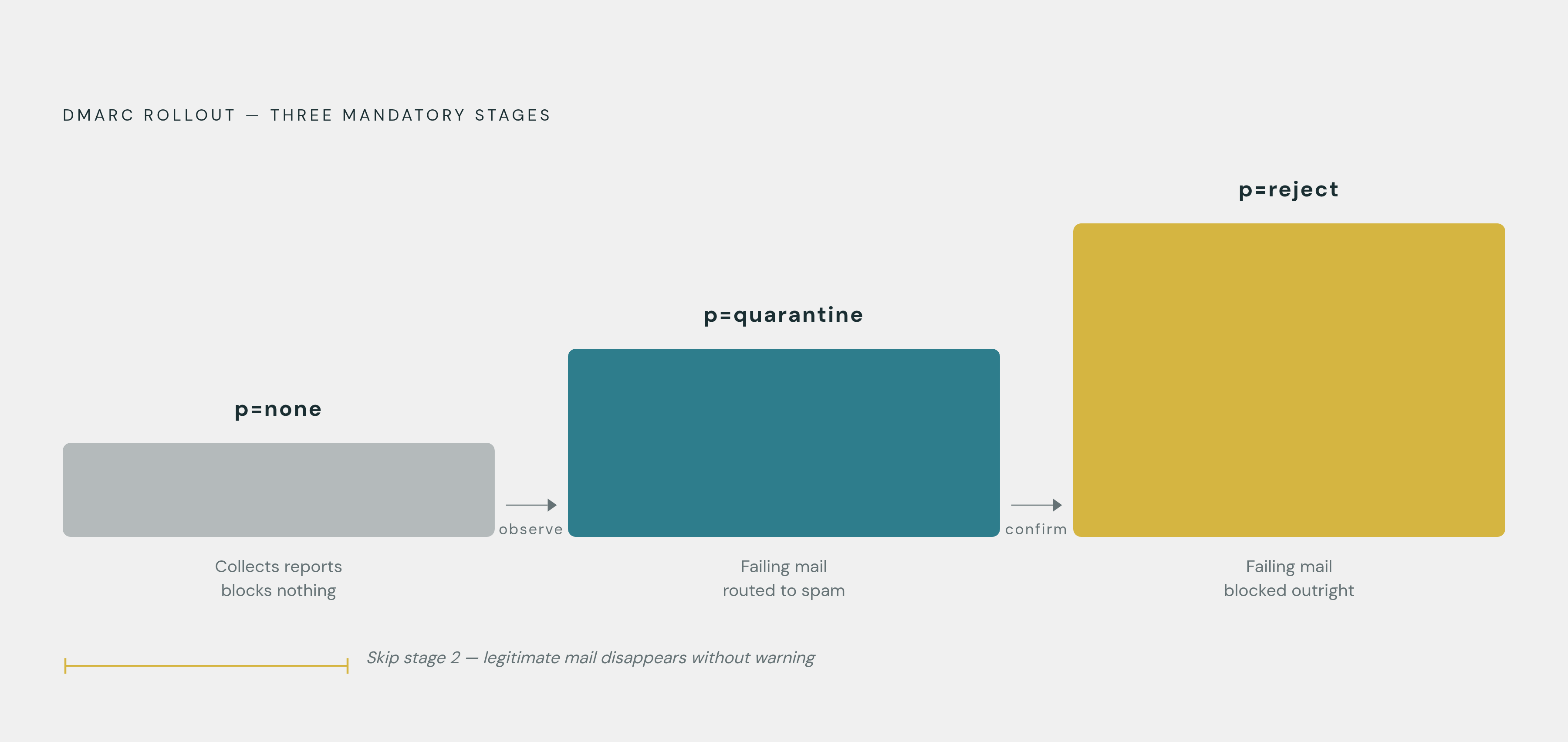
DMARC has to be rolled out in stages. Start at p=none, which collects reports without blocking anything. Once the sending landscape is understood, move to p=quarantine. Only after that should a domain move to p=reject. Sender guidance is consistent on this sequence, and skipping a step is how legitimate mail starts disappearing without warning.
One trap catches more senders than it should: SPF fails if resolving the record requires more than 10 DNS lookups. B2B stacks that layer multiple sending and marketing tools on one domain blow past this limit constantly, often without anyone noticing until deliverability quietly craters. SPF flattening or subdomain delegation fixes it.
The feedback loop matters as much as the records themselves. Without registering for Google Postmaster Tools and Yahoo Sender Hub, a sender has no real visibility into complaint rates as each provider actually sees them. All three are free, and none of them are optional if deliverability is being taken seriously.
For one-click unsubscribe, the mechanics are specific. RFC 8058 requires both a List-Unsubscribe and a List-Unsubscribe-Post header. When a recipient clicks, the provider sends a POST request directly, the user never sees a preference center. It applies to marketing and promotional mail; transactional mail like order confirmations or password resets is exempt. And requests need to be honored within two days.
A branded tracking domain, using a CNAME so tracking links live on a subdomain, isn't required by any provider. But it isolates a sender's reputation from whatever else is happening on shared tracking infrastructure used by other accounts on the same platform, and that isolation is worth having. Validating DNS records thoroughly during setup helps catch configuration errors that might otherwise stay invisible until deliverability collapses.
Domain and mailbox architecture for cold outbound
Cold outbound should never run from the primary company domain, and a dedicated sending domain or subdomain keeps any deliverability damage from touching the brand domain's reputation almost as a rule at this point. That's not a suggestion, it's close to a rule at this point: a dedicated sending domain or subdomain keeps any deliverability damage from touching the brand domain's reputation.
A few things matter when setting up that sending domain. Age is one: brand-new domains get scrutinized harder, and a domain with some legitimate activity behind it before campaigns start looks less suspicious from day one. Branding is another. The domain should look recognizably tied to the main brand, something like try-brandname.com or getbrandname.com, so a recipient can glance at it and verify it's legitimate. And for teams scaling, registering multiple sending domains, one per sending identity, limits the blast radius if any single domain's reputation takes a hit.
IP choice is a real fork in the road. A dedicated IP gives full control over sender reputation but demands ongoing maintenance and its own warm-up curve, and it suits high-volume senders or regulated industries better. A shared IP is easier to start with and comes bundled with most sending platforms, but it carries risk if other tenants on that IP have sloppy sending habits.
On email providers: Google Workspace is widely treated as the deliverability benchmark. Microsoft 365 works well for teams already inside that ecosystem. Custom SMTP setups offer more flexibility but need more hands-on technical upkeep to stay clean.
Volume per mailbox has a known safe ceiling. Cold outreach guidance puts the safe ceiling at 50 to 100 emails per mailbox per day. Most teams scale by running 3 to 5 warmed mailboxes in parallel rather than pushing one mailbox harder, volume scales sideways, not up. Apollo's sending infrastructure is built around this pattern directly, supporting multiple mailboxes and domains inside one platform so teams running 3 to 5 accounts aren't bolting on separate tools just to manage sequencing and deliverability settings account by account.
Domain warm-up: the ramp that earns provider trust before campaigns begin
A domain that jumps from zero to a few hundred sends a day looks like a spam operation to inbox providers, no matter how good the copy is. Providers watch new senders closely, and volume that spikes without a history behind it reads as a signal on its own, separate from content.
The ramp itself has a fairly consistent shape across guidance. Week one runs 10 to 20 emails per inbox per day, a range both Mailpool and Instantly cite as the starting point. From week two on, daily volume increases by 10 to 20% a week, with bounces and complaints checked before each step up. Instantly's deliverability guide states that brand-new domains need 4 to 6 weeks of this before they're ready for full campaign volume, and the milestone to hit before calling a domain production-ready is consistently strong inbox placement on seed tests.
Warm-up shouldn't stop once a campaign launches, either. Reputation decays during long gaps between sends, so keeping some warm-up activity running between campaigns matters as much as the initial ramp. Legitimate warm-up networks build positive engagement through reply chains and vary sending times to avoid tripping pattern-detection filters.
Steer clear of "blackhat" warm-up services running fake or low-quality accounts. Providers catch these in 2026, and instead of protecting a domain, they speed up blacklisting. Pace should follow placement test results, not a calendar: if spam placement appears at any step of the ramp, hold volume flat until it clears before moving forward again.
A well-warmed domain is still just infrastructure, though. It can be wiped out on the very first real campaign send if the list behind it is full of dead or invalid addresses.
Why bad contact data destroys deliverability faster than any technical misconfiguration
Research from Unify GTM and Prospeo finds that B2B contact data decays fast, roughly 2.1% a month, which compounds to somewhere between 22% and 30% a year overall. Work email at tech and SaaS companies decays even faster, 25 to 35% annually, and at startups and VC-backed companies it climbs to 30 to 40% a year. A list that looked clean six months ago is not the same list today.
The consequences appear fast once bad data enters a campaign. A hard bounce rate above 2% can trigger spam filters and do real damage to domain reputation, and per Icemail's deliverability guide, that 2% figure is also the outer limit providers themselves enforce. Even in bounce-heavy sectors like B2B sales and recruitment, healthy campaigns hold between 0.7% and 1.5%. Below 2% is the line everyone, regardless of industry, is expected to stay under.
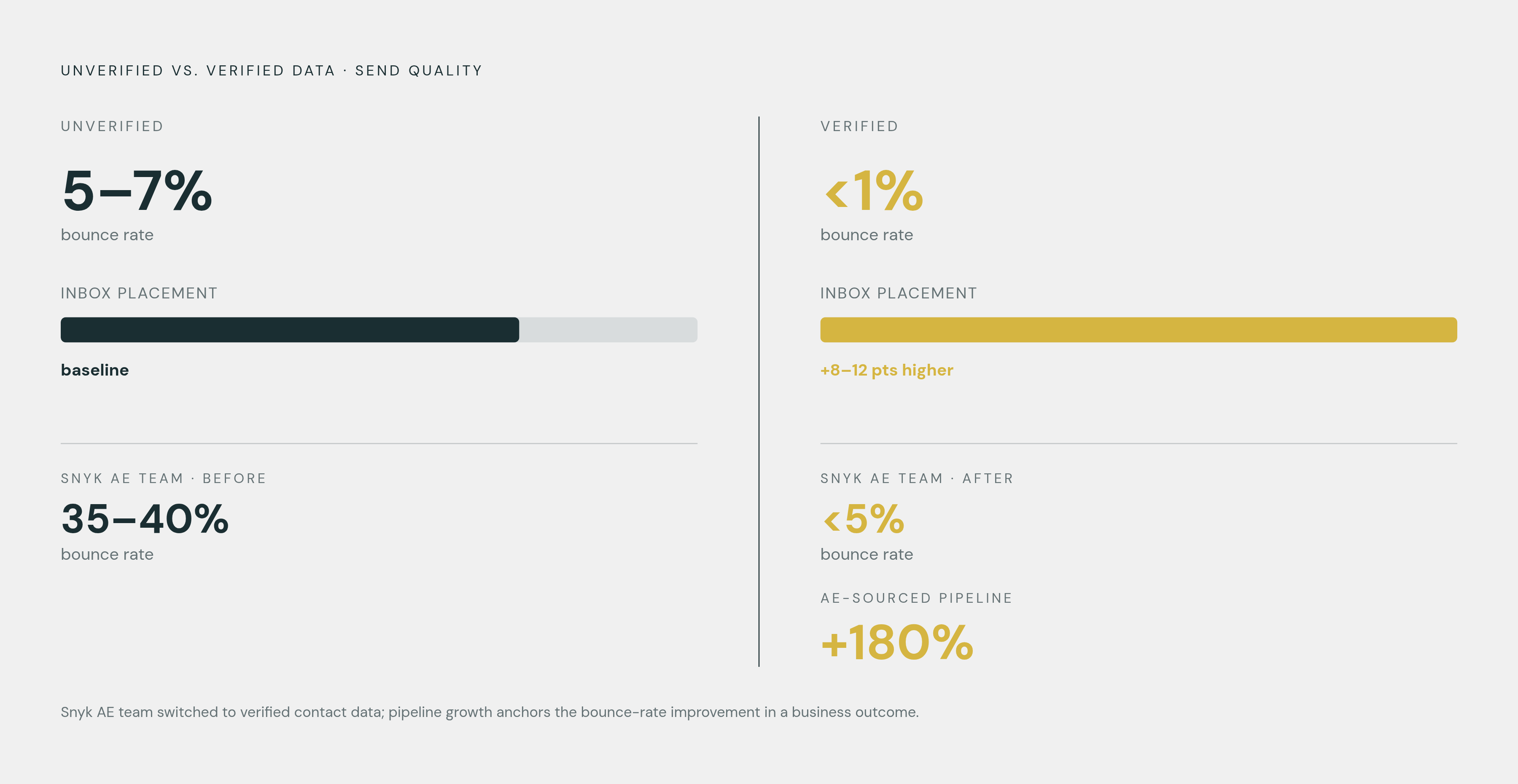
The gap between verified and unverified data is not small. Unify GTM's research shows that senders who actively manage list hygiene get inbox placement rates 8 to 12 percentage points higher than those who don't. Non-validated datasets run 5 to 7% bounce rates; verified data stays under 1%.
Snyk's AE team ran bounce rates of 35 to 40% before switching to verified data. After the switch, bounce rates dropped below 5%, and AE-sourced pipeline grew 180%.
Where the data comes from matters as much as anything covered so far about warm-up or authentication. A database running a real-world bounce rate above 15% will do serious damage to domain reputation on the very first campaign. Apollo's database of contacts, numbering well into the hundreds of millions, includes a Verified Emails filter, and that verified subset is the right starting point precisely because unverified contacts, from any source, are the fastest route to bounce-rate damage.
Contact verification as a continuous process, not a one-time list pull
Verification needs to happen within 48 hours of sending, not at the moment a list gets pulled. A list built last quarter has already decayed in ways that matter. Given how fast contact data ages, treating verification as a one-time step at acquisition is close to not verifying.
Most senders aren't there yet. Clearout's email data quality benchmark shows roughly 60% of senders run list hygiene regularly, but just over 25% do it monthly or more. The majority are behind the cadence this decay rate actually demands.
A working data hygiene loop has a few fixed points. Verify at capture, so no unverified address ever enters the CRM. Run every contact through a finder-plus-verifier flow on the way in, not after the fact. Re-verify before every send, not once a quarter. And keep a global suppression list for bounces, complaints, and opt-outs that never gets overridden, not even for a high-value account.
Waterfall enrichment is becoming a standard approach: right before a sequence attempts a send, the system checks whether the address is live, and if that fails, it falls back to secondary and tertiary data sources. Role accounts like info@ or hello@ need to be stripped out too, and catch-all domains flagged separately. Neither hard-bounces outright, but neither produces real engagement either, and that absence of engagement erodes reputation through the scoring side of provider algorithms just as surely as a bounce does.
Apollo's data layer sits directly on top of this problem, giving teams a single platform for sourcing and verifying contacts rather than managing separate tools for each step.
Monitoring infrastructure: seeing problems before providers penalize you
Three dashboards matter here, and all three are free. Google Postmaster Tools shows domain reputation, IP reputation, Google's own measurement of spam rate, and delivery errors. Yahoo Sender Hub is the equivalent for Yahoo and AOL traffic, providing visibility into complaint rates from that side. Microsoft's sender feedback tools cover complaint rates and junk mail rates for anything going to Outlook.com, Hotmail, and Live.com. None of these are optional extras. They're the only real source of truth for how each provider sees a sending domain, since none of that data appears anywhere else.
Complaint rate is the number to watch most closely. If Postmaster Tools shows spam complaints trending toward 0.10%, that's an early warning worth acting on immediately, well before the hard limit of 0.3% arrives, because senders become ineligible for Google's mitigations once that threshold is hit.
Before any major campaign send, run an inbox placement test. Seed-testing tools show exactly where mail lands, primary, promotions, or spam, across provider inboxes before real contacts ever see it. That test is the quality gate standing between warm-up and full production sending, and skipping it means finding out about a placement problem from a stalled reply rate instead.
Strong cold outbound operations build automatic pause logic into the send flow: if bounce rate or complaint rate crosses a set threshold mid-campaign, sending halts pending review, rather than letting a bad batch keep going while someone notices manually. And blacklist monitoring still matters even with clean authentication in place. A domain can land on a third-party blacklist independent of SPF, DKIM, and DMARC all passing. Monitoring has to run continuously, not just at setup.